

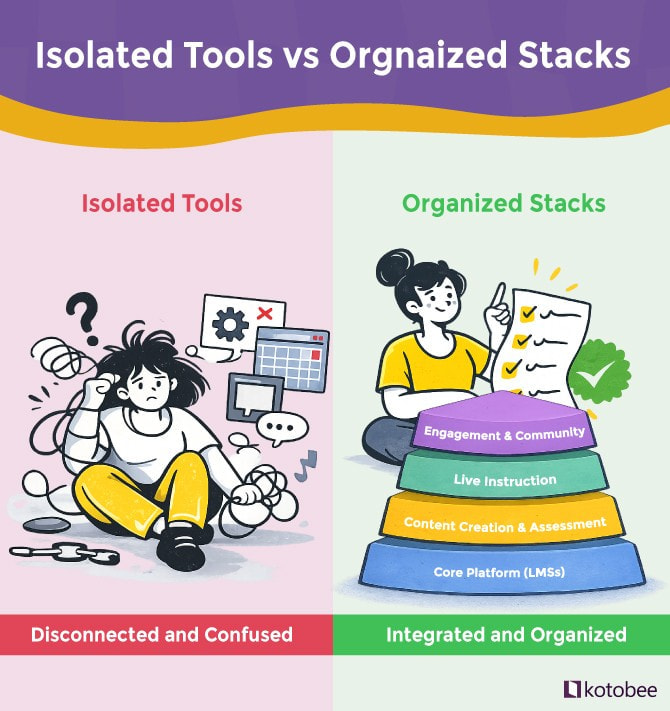
When creating a blended learning environment, it’s best to create an integrated ecosystem where the learning tools meet their educational goals and needs. Selecting tools one by one, without considering how they connect, can sometimes lead to challenges such as overlapping features, disconnected workflows, or learners getting lost in a maze of platforms.
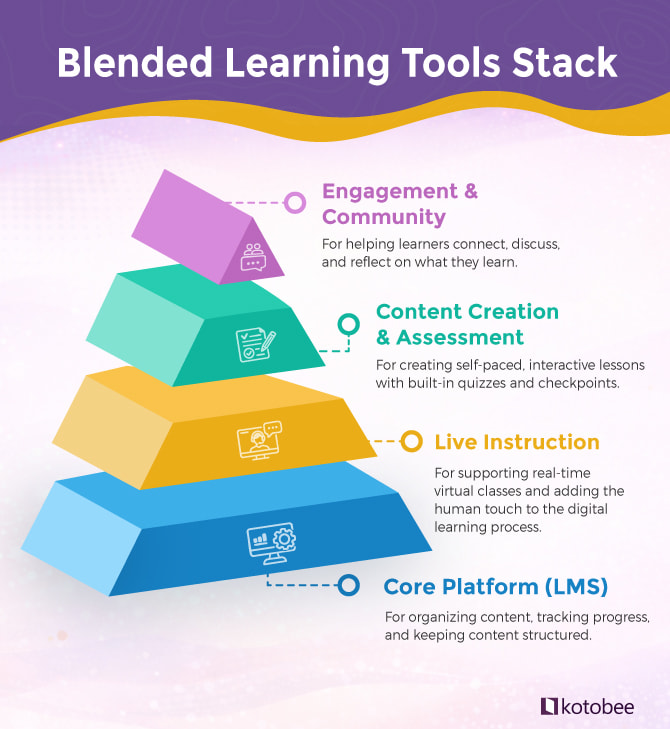
That’s why thinking in terms of a blended learning tools stack can be useful. Like a well-built structure, this stack shows which tools form the foundation, which layers support active engagement, and which ones sit at the top, encouraging collaboration and creating a sense of community.
In this article, we’ll break down the four key layers of the stack, highlight the tools that work best in each layer, and show how they fit together to create an effective blended learning environment.
What Is a Blended Learning Tools Stack?
The blended learning stack is a simple way to visualize how different tools work together to create a cohesive learning experience. Each layer depends on the one below, so skipping a layer can weaken the whole system. Thinking in terms of a stack helps you choose tools that truly complement each other.
1. The Core Platform Layer (Foundation)
At the base of the blended learning stack sits the Core Platform Layer, most often an LMS. This type of platform acts as a central hub for the entire blended learning experience. When it’s solid, every other tool feels connected. When it isn’t, even strong tools higher up feel fragmented.
The core platform’s main job is to provide structure. It organizes content, manages access, and gives learners a clear place to return to for information, whether they’re attending live sessions, completing self-paced work, or reviewing materials after class.
Key Features to Look For
Instead of chasing advanced features and tools, focus on capabilities that support your blended learning objectives. That’s why we recommend choosing an LMS that offers:
- Clear course structure to organize live sessions and self-paced activities.
- Progress tracking that shows engagement, performance, and learning gaps.
- Integration support with video, content, and assessment tools.
- Mobile accessibility for learning across devices
- User and role management for instructors, admins, and learners.
Common Tools in this Layer
- Moodle: Best for institutions that need deep customization and control, especially in higher education and large academic programs.
- Canvas: Well-suited for universities and schools that prioritize usability, modern design, and strong analytics.
- Google Classroom: Ideal for K-12 and smaller educational programs that need a simple, low-friction way to manage blended classes.
- TalentLMS: A strong fit for corporate training and professional learning courses that require structured courses and reporting.
- LearnWorlds: Good for blended programs that rely heavily on interactive content, self-paced learning, and branded learner experiences.
2. Live Instruction Layer
Since blended learning relies heavily on live instruction tools, this layer comes directly after the core one. It is where real-time teaching happens: lectures, workshops, discussions, and office hours that add the human touch to the digital learning process. While the LMS provides structure, live instruction tools provide engagement and interaction.
In blended learning environments, these tools shouldn’t operate as standalone meeting apps. It’s important that they integrate well with the core platform; this way, live sessions can be linked to course modules, recordings, and follow-up activities. When this connection is smooth, live sessions become part of the course flow rather than isolated events.
Key Features to Look For
For blended learning, live instruction tools should support more than basic video calls; they should have:
- Reliable video and audio quality for longer teaching sessions.
- Breakout rooms for small-group discussion and collaboration.
- Session recording for flexible, on-demand access.
- Screen sharing and presentation tools for structured instruction.
- Integration with LMS platforms for scheduling and access.
Common Tools in this Layer
- Zoom: Well-suited for interactive live classes, with breakout rooms and the option to record the sessions.
- Microsoft Teams: Ideal for institutions already using Microsoft 365, as it combines video, chat, and file collaboration.
- Google Meet: A simple option for schools using Google Classroom, with minimal setup and easy access.
- BigBlueButton: An open-source virtual classroom tool designed specifically for online and blended education, often integrated directly into LMS platforms.
- Adobe Connect: Good for structured webinars and collaborative sessions, with virtual rooms and interactive tools like polls and whiteboards.
3. Content and Assessment Layer
This layer is where blended learning becomes interactive instead of just instructional. Tools in this layer help create self-paced, interactive lessons with built-in quizzes and checkpoints to measure understanding.
In effective blended learning setups, this layer reduces the need for long live classes by placing explanations, practice activities, and reflection into interactive, self-paced content. This allows live time to focus mainly on discussion, feedback, and application rather than passive instruction.
Key Features to Look For
The tools in this layer are designed to support both engagement and continuous assessment, which is why the following features are especially important:
- Interactive elements such as quizzes, mini-apps, animations and 3D images.
- Supports self-paced learning with clear sequencing and milestones.
- Built-in assessments to measure learners’ understanding.
- Easy content updates whenever needed.
- LMS compatibility for embedding and tracking learners’ progress.
- Rich media support for video, audio, and images.
Common Tools in This Layer
- Kotobee Author: Builds interactive ebooks with embedded quizzes and assessments that can be easily integrated into any LMS.
- iSpring Suite: Creates interactive lessons and assessments from presentations for structured blended learning.
- Nearpod: Delivers interactive lessons with built-in activities and assessments for live and self-paced use.
- Edpuzzle: Turns videos into interactive lessons with embedded questions and ways to check learners’ comprehension.
- Loom: Supports short instructional videos that complement live sessions and include optional quizzes or reflection questions.
4. Engagement and Community Layer
At the top of the blended learning stack is the engagement and community layer. This layer focuses on social learning, which helps turn isolated lessons into collaborative work. While the prior layer delivers content and instruction, this one ensures learners connect, discuss, and reflect on what they learn.
Engagement tools help learners stay motivated, ask questions, collaborate with peers, and build a sense of community. Without this layer, even well-designed content and live sessions can feel disconnected.
Key Features to Look For
When you choose tools in this layer, try to focus on the ones that support communication, collaboration, and ongoing learner engagement. They should also have the following features:
- Discussion spaces for reflection, Q&A, and peer interaction.
- Collaboration tools for group work and projects.
- Integration with LMS and content tools to keep interactions connected to course materials.
- Notifications and reminders to maintain engagement.
- Accessible across devices so learners can interact anytime, anywhere.
Common Tools in This Layer
- Slack: Supports real-time communication and collaboration within learning groups.
- Discord: Builds interactive communities with channels, voice, and chat for discussion and collaboration.
- Circle: Provides a structured community platform for courses, cohorts, and peer learning.
- Moodle Forums: Enables discussion boards and threaded conversations directly within the LMS.
- Piazza: Designed for academic Q&A, peer-to-peer discussion, and collaborative problem solving.
Recommended Blended Learning Stacks for Different Organizations
Choosing the right tools for blended learning isn’t about picking the most popular platforms; it’s about assembling a stack that fits your learners, goals, and workflow. The examples below show how the same layers can be combined differently depending on the organization type. Each stack highlights tools that work well together and the features that make them effective for a specific type of organization.
As you go through the following stacks, keep in mind that they aren’t meant to be copied exactly. They’re just examples of how blended learning tools can work together differently depending on the context, while still following the same underlying structure.
K-12 Education
K–12 schools need tools that are simple, familiar, and easy to use. Teachers shouldn’t need hours of training to get started, and students should be able to jump right in without feeling lost. The tools should fit naturally into everyday classroom routines without disrupting them.
- Google Classroom as the core LMS for its simplicity and integration with Google Workspace.
- Zoom or Microsoft Teams for live classes with basic controls and wide device support.
- Kotobee Author for creating interactive, self-paced ebooks that integrate smoothly into the LMS.
- Nearpod or Edpuzzle for interactive lessons with built-in checkpoints and questions.
- Google Forms or Canvas quizzes for quick, low-friction assessments.
Higher Education
Higher education institutions need flexibility, scalability, and deeper insight into learner progress. That’s because the courses are often complex, long-running, and designed for large, diverse audiences.
- Moodle or Canvas as core platforms that support advanced course structures.
- Zoom or Microsoft Teams for lectures, seminars, and hybrid classrooms.
- Kotobee Author or iSpring Suite for building interactive content and formative assessments inside courses.
- Piazza or Moodle Forums to support academic dialogue and peer learning.
Employee Training and L&D
Corporate training usually has one main goal, and that is helping employees learn quickly and apply what they’ve learned right away. The tools you choose should be easy to roll out, blend into everyday work, and clearly show whether the training is actually making a difference.
- TalentLMS is a fast-to-launch core system with built-in reporting.
- Zoom for live onboarding sessions and instructor-led workshops.
- Kotobee Author for interactive manuals, product guides, and compliance content that integrate into any LMS.
- Slack or Microsoft Teams to keep learning connected to everyday work communication.
Professional Training and Certification
Certification programs need to be straightforward and well-organized. Learners should know exactly what they need to complete and be able to prove they’ve done it. That is why the tools you use should support secure content, reliable assessments, and easy progress tracking.
- Moodle or LearnWorlds with role-based access to control who sees what and when.
- Zoom or Adobe Connect for instructor-led virtual classrooms.
- Kotobee Author or iSpring Suite for interactive self-paced content with embedded assessments.
- Moodle Forums or Circle for discussion and learner support.
Final Thoughts
As we’ve seen throughout the article, blended learning works best when the tools are chosen as a stack, not as isolated solutions. The main reason behind that is simple: no single platform can do everything well. But when core systems, content tools, live instruction, engagement, and assessment tools work together, learning becomes more flexible, scalable, and effective. So, instead of chasing all-in-one solutions, focus on building a balanced stack that fits your learners, your content, and your educational goals!
More from Our Blog
Imagine you’ve been traveling for months. You return home, set…
As an ebook format, EPUB remains the go-to standard for…
Have you ever wondered if nonfiction can be truly creative?…

